
Billing & Subscription Upgrades in InvoiceHela
Introduction
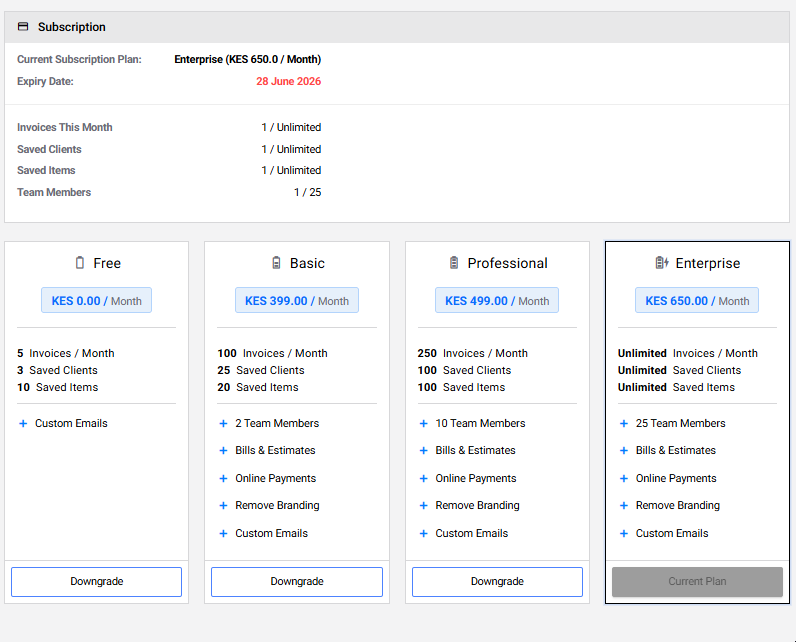
InvoiceHela offers flexible billing cycles and subscription plans. You can start free, then upgrade anytime to unlock premium features such as unlimited invoicing, saved clients, advanced branding, and online payments.
How to Upgrade
Upgrading your subscription is quick and secure. Follow these steps:
From your Dashboard, click the Upgrade button.
You’ll be redirected to the Subscription Page. Select your preferred plan and billing cycle (monthly, semi-annual, annual, or longer).
Proceed to checkout. Choose your payment method — Card (via Stripe) or M-Pesa for Kenya — and complete payment securely.
Accepted Payment Methods
You can pay securely using:
- Card Payments – Processed through Stripe for global customers.
- M-Pesa – Available for businesses in Kenya, integrated directly for convenience.
✅ Summary
Upgrading your subscription in InvoiceHela is simple: click Upgrade from the dashboard, select your plan, and checkout securely. With flexible billing cycles and multiple payment options, you can enjoy premium features tailored to your business.