
Payment Integration – M-Pesa Setup
Introduction
In InvoiceHela, you can integrate payment providers to allow clients to pay invoices directly online. One of the most important integrations for Kenyan businesses is M-Pesa STK Push (Express Checkout), powered by the Safaricom Daraja API.
Purpose of Setting Up a Payment Account
The main reason for configuring a payment account in InvoiceHela is to link your invoices directly to a payment method. When you set up M-Pesa:
- Every invoice you send can include M-Pesa as a payment option.
- Customers can pay directly into your business’s M-Pesa account from the invoice.
- Once payment is confirmed, the invoice is automatically marked as Paid.
- The system updates your records instantly and generates a receipt for the customer.
This automation saves time, eliminates manual reconciliation, and ensures a smooth, professional experience for both you and your clients.
How to Setup Mpesa Payment on your account
From your Dashboard, click the Business Settings (gear icon).
On the Business Settings page, select Payment Settings.
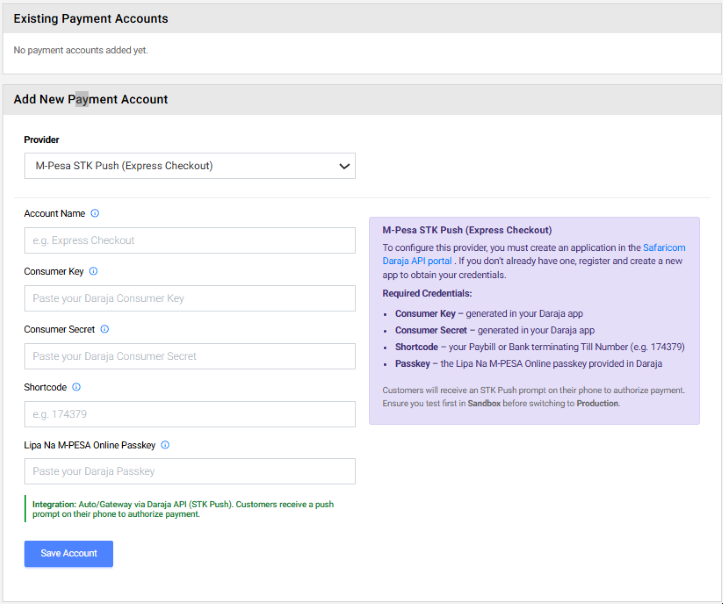
In the Add New Payment Account section, open the Provider dropdown.
Select M-Pesa STK Push (Express Checkout) from the list of providers.
Enter your Daraja API credentials (Consumer Key, Consumer Secret, Shortcode, Passkey).
Click Save Account and test in Sandbox before switching to Production.
Setting Up M-Pesa STK Push
To configure M-Pesa Express Checkout, follow these steps:
- Register on Safaricom Daraja API Portal – Create an application to obtain your credentials.
- Enter Required Credentials in the payment account form:
- Consumer Key – generated in your Daraja app.
- Consumer Secret – generated in your Daraja app.
- Shortcode – your Paybill or Till Number (e.g. 174379).
- Passkey – the Lipa Na M-PESA Online passkey provided in Daraja.
- Save Account – Once saved, your business can accept M-Pesa payments directly from invoices.
- Test in Sandbox – Always test in the Daraja Sandbox environment before switching to Production.
Other Payment Options
Besides M-Pesa, you can also configure:
- PayPal Gateway – automatic integration via PayPal SDK.
- Bank Transfer – manual entry of bank details.
- M-Pesa Paybill, BuyGoods, SendMoney – manual recording of transactions using Paybill numbers, Till numbers, or phone numbers.
✅ Save and Apply
After entering your credentials and saving, your account is ready to accept payments. Clients will enjoy seamless checkout, and you’ll benefit from faster, more reliable payment processing.